16 Keys Capacitive Touch TTP229 I2C Module
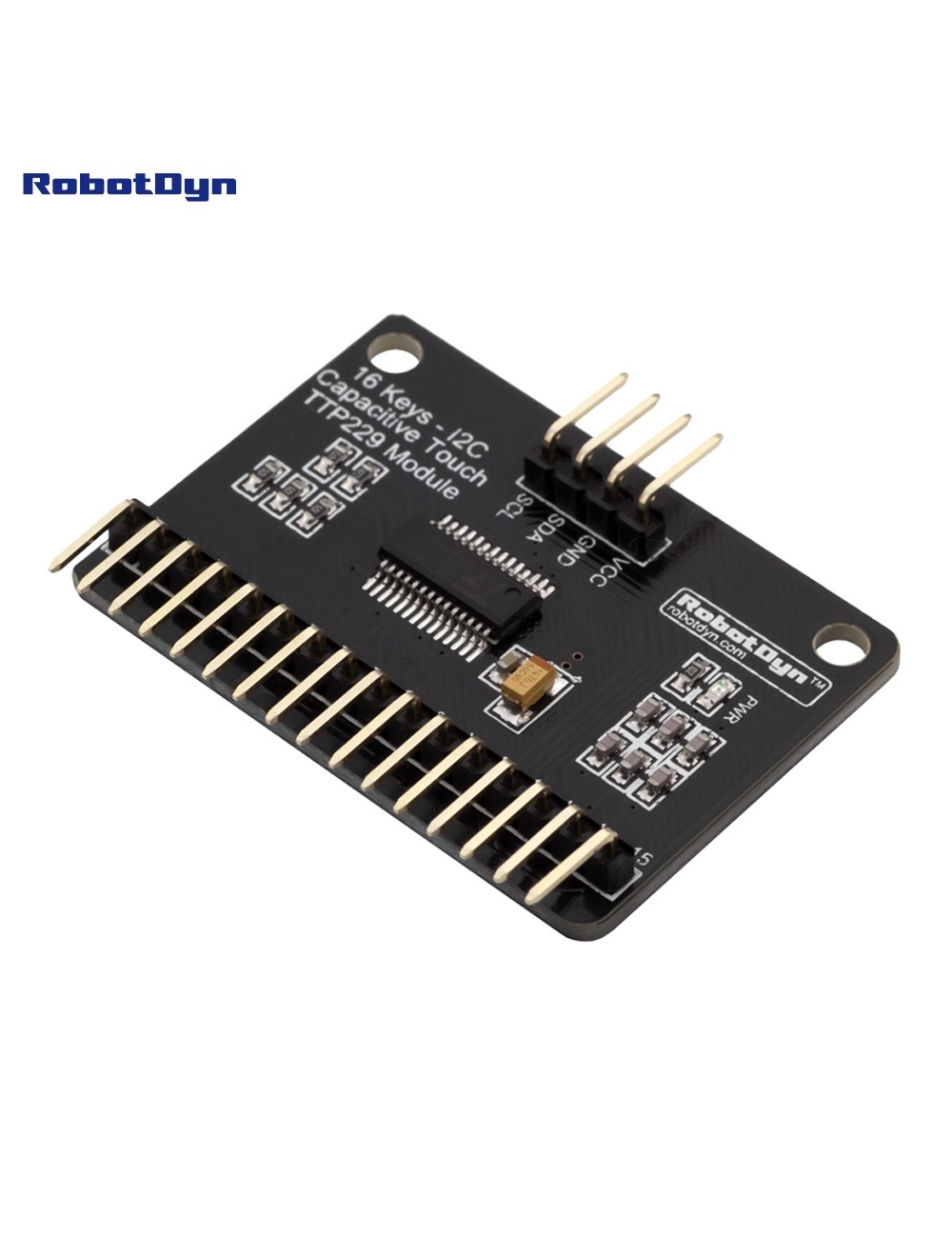
Overview
The RobotDyn TTP229 module is a 16-channel capacitive touch sensor based on the TTP229BSF IC. It detects touch on any conductive material connected to its 16 input pads — including custom PCB touchpads, metal objects, conductive ink prints, or even fruit (great for educational projects like MaKey MaKey-style demos).
The module communicates with microcontrollers via a 2-wire serial protocol (often called “I2C” though it’s not strictly I2C-compliant — it’s a custom SCL/SDO clock-and-data scheme).
Operating Modes
The module supports two modes, selected via the TP2 solder jumper:
8-Key Mode (TP2 open)
- 8 inputs active
- Each key has a dedicated output pin (OUT1–OUT8)
- Multiple keys can be touched simultaneously
- Easiest for beginners — no library needed
16-Key Mode (TP2 shorted)
- All 16 inputs active
- Output via 2-pin serial (SCL clock + SDO data)
- Library required to decode which key is touched
- Only one key at a time can be reliably detected
Pinout
| Pin | Function | Notes |
|---|---|---|
| VCC | Power supply | 2.4–5.5 V |
| GND | Ground | |
| SCL | Serial clock | I/O — pulse to read next bit |
| SDO | Serial data out | Bit 1 = key pressed |
| TP1/TP2 | Mode jumpers | TP2 short = 16-key mode |
| OUT1–OUT8 | Direct outputs (8-key mode only) | Active HIGH |
Reading 16 Keys (Arduino)
In 16-key mode, you read the keys by pulsing SCL 16 times and sampling SDO on each pulse:
#define SCL_PIN 2
#define SDO_PIN 3

uint16_t readTouch() {
  uint16_t data = 0;
  for (int i = 0; i < 16; i++) {
    digitalWrite(SCL_PIN, LOW);
    delayMicroseconds(2);
    digitalWrite(SCL_PIN, HIGH);
    delayMicroseconds(2);
    if (digitalRead(SDO_PIN) == LOW) {
      data |= (1 << i);   // active LOW on press
    }
  }
  return data;
}

void setup() {
  pinMode(SCL_PIN, OUTPUT);
  pinMode(SDO_PIN, INPUT);
  digitalWrite(SCL_PIN, HIGH);
  Serial.begin(9600);
}

void loop() {
  uint16_t keys = readTouch();
  if (keys) {
    Serial.print("Keys: 0x");
    Serial.println(keys, HEX);
  }
  delay(50);
}
For a more polished implementation use the TT_TouchKeypadTTP229 library.
Sensitivity Adjustment
The capacitor at C4 (typically 10 nF) sets sensitivity. Replace with:
- Lower capacitance (1–5 nF): more sensitive, can detect through thicker insulation, more prone to false triggers
- Higher capacitance (15–50 nF): less sensitive, requires direct contact, fewer false triggers
For touchpads under glass or thick plastic, start with 4.7 nF.
Auto-Calibration
The TTP229 self-calibrates roughly every 4 seconds against the current baseline capacitance. This means:
- Drift from temperature and humidity is automatically compensated
- A finger held continuously will eventually be “calibrated out” (released after ~4 s)
- Initial power-on calibration takes ~500 ms — keep hands away from pads at startup
Common Uses
- Custom keypads (PIN entry, menu navigation)
- Music controllers (touch keys triggering MIDI notes)
- Interactive art installations
- MaKey MaKey-style educational projects (banana piano)
- Industrial control panels with sealed surfaces
Where to Buy in 2026
The TTP229 IC is still in production, and RobotDyn-compatible modules are widely cloned. Look for boards with the TTP229BSF marking (not the older TTP229B without “SF” — those are 8-key only).
Documentation
- TTP229BSF datasheet — coming soon
- Mode jumper reference — coming soon
- Schematic — coming soon